


11 Best Restaurant Website Templates for Menus and Ordering
Picking from the best restaurant website templates can save you weeks of design work and thousands in developer fees. But not every template is built with restaurants in mind. Some look great on the surface but fall apart when you try to add an online menu, accept orders, or manage reservations. The wrong choice means reworking everything from scratch, or settling for a site that doesn't actually drive revenue.
The right template should do more than look good. It needs to handle menus cleanly, load fast on mobile, and, if you're serious about ditching third-party delivery commissions, support direct online ordering. That's exactly what we focus on at The Foody Gram, where we build commission-free ordering websites for restaurants with a 48–72 hour turnaround.
Whether you're exploring WordPress themes, HTML templates, or fully managed platforms, this list breaks down 11 restaurant website templates worth considering. We'll cover what each one does well, where it falls short, and which types of restaurants each template fits best, so you can make a confident decision without the guesswork.
1. The Foody Gram
The Foody Gram is not a template library. It's a fully managed restaurant website platform that builds a custom, commission-free online ordering site for your restaurant. Instead of handing you a template and leaving you to figure out the rest, The Foody Gram handles the design, setup, menu uploads, and ongoing updates. You get a branded, mobile-optimized site ready to take orders within 48 to 72 hours of signing up.
What you get
Your website comes built with a clean menu display, direct online ordering for pickup and delivery, and a real-time order dashboard your kitchen staff can use immediately. The platform also supports pre-orders and reservations, multi-location management for growing restaurant groups, and kitchen ticket printing. Every plan includes 24/7 customer support that handles menu changes for you, so you never have to log in and figure out a page editor just to update a price.
This matters most if you're currently paying 20-30% commissions to third-party apps, because The Foody Gram routes all orders directly to you with no per-order fees.
Unlike most of the best restaurant website templates on this list, The Foody Gram also gives you full ownership of your customer data. You're not renting access to your audience through a third-party marketplace. Every order goes through your site, your brand, and your payment processing with direct deposit.
Best fit for
The Foody Gram works best for independent restaurant owners and small restaurant groups that already have consistent online order volume and want to stop losing margin to delivery apps. It fits pizzerias, fast-casual spots, and ethnic cuisine restaurants especially well. If your priority is a site that looks professional and generates revenue without technical headaches, this platform is built for that specific outcome. It is not the right fit for restaurants that want to build and control their own code.
Pricing and total cost
Plans run from $159 to $199 per month, depending on the tier. There are no setup fees, no contracts, and no per-order commissions. The Foody Gram also backs every plan with a 45-day money-back guarantee, which removes most of the risk in switching from a third-party platform. For a restaurant doing strong weekly order volume, the monthly flat fee typically pays for itself within the first week of saved commissions.
2. Wix restaurants and food templates
Wix offers a dedicated collection of restaurant and food templates you can browse directly in their template library. These templates cover styles from fine dining to casual takeout, and you customize them using Wix's drag-and-drop editor without writing a single line of code. The variety is solid, with hundreds of templates spread across food-related categories.
What you get
The templates include pre-built sections for menus, photo galleries, reservations, and contact pages. You can add online ordering through Wix's built-in tools or third-party integrations, though this often requires extra setup steps and configuration time. Templates are mobile-responsive out of the box, and Wix's App Market gives you access to booking systems, loyalty programs, and basic order management tools.
Adding real online ordering with payment processing typically requires a plan upgrade or a third-party app, which increases your monthly total noticeably.
Best fit for
Wix works well for restaurants that want full design flexibility without hiring a developer. It's a strong option for smaller restaurants and cafes focused on showcasing a menu and location rather than processing high-volume online orders. If you can spare a few hours learning the editor, Wix gives you solid creative control over your site.
Pricing and total cost
Business plans on Wix start around $17 per month, but restaurants needing payment processing will likely need a higher-tier plan. Third-party ordering apps add to that base cost and can vary significantly. Compared to purpose-built platforms, Wix gives you more design control but requires more configuration to get ordering working the way you need. Among the best restaurant website templates, it's a less efficient path if online ordering is your primary goal.
3. Squarespace restaurant templates
Squarespace takes a different approach than Wix by focusing on visual design quality over raw template quantity. Its restaurant templates are polished, minimal, and built to highlight food photography and brand identity. You can browse a curated set of layouts suited to everything from upscale dining rooms to neighborhood cafes, all customized through Squarespace's block-based editor without touching any code.
What you get
Each template includes pre-built sections for menus, event listings, photo galleries, and contact pages. Squarespace's built-in scheduling tool handles reservations, and the platform connects with OpenTable and Tock for table bookings. Online ordering requires upgrading to Squarespace's Commerce plans, which layer product and order management tools onto the standard website builder but add meaningful complexity to the setup process.
The templates look sharp on desktop and mobile, but the ordering tools are designed more for retail than high-volume restaurant operations.
Best fit for
Squarespace fits restaurants that prioritize visual brand presentation over processing large order volumes. Fine dining spots, wine bars, and boutique cafes get the most value here. If you want one of the best restaurant website templates strictly for showcasing your space, menu, and photography in a clean format, Squarespace delivers. It is a weaker fit for fast-casual or takeout-heavy restaurants that need a fast, simple ordering flow for customers on mobile.
Pricing and total cost
Personal plans start at $16 per month, but Commerce plans with ordering functionality run $28 to $52 per month. Third-party reservation and ordering integrations can push that total higher depending on what you bolt on. You get strong design control, but expect to spend real time configuring everything before your site is ready to take orders.
4. Webflow restaurant templates
Webflow sits in a different category than Wix or Squarespace. It gives you near-full design control through a visual builder that generates clean HTML, CSS, and JavaScript, without requiring you to write code manually. Webflow's template marketplace includes several restaurant-focused layouts, and a developer-friendly community regularly publishes additional paid and free templates suited to food and hospitality businesses.
What you get
Webflow templates come with polished, mobile-responsive layouts that cover menus, galleries, reservation sections, and contact pages. You can customize every element with precision using the visual editor, which behaves more like design software than a typical website builder. Native ordering is not built in, so you would need to integrate a third-party tool to process online orders, which adds setup time and often a separate monthly cost.
Webflow gives you some of the cleanest exported code of any no-code builder, which matters if you ever want a developer to take over or extend the site.
Best fit for
Webflow works well for restaurant owners with some technical comfort or access to a designer or developer who knows the platform. Upscale restaurants, fine dining spots, and cafes focused on brand storytelling get strong results here. If you want creative control closer to a custom-built site without the full development budget, Webflow delivers. It is not a strong fit if you need a quick setup or built-in commission-free ordering.
Pricing and total cost
Webflow's site plans start at $14 per month for basic hosting. Restaurants needing CMS functionality or ecommerce tools pay more, with plans reaching $29 or higher per month. Premium templates range from $24 to $149 as a one-time purchase. Compared to other best restaurant website templates options, the total cost stays manageable, but the configuration time required is higher than most platforms on this list.
5. Framer restaurant templates
Framer is a design-first website builder that attracts designers and tech-forward businesses with its speed and visual output quality. Its template marketplace includes restaurant-specific layouts with modern aesthetics, sharp typography, and smooth animations that most traditional website builders cannot match out of the box. You get a visually impressive starting point, but the platform carries a steeper learning curve than typical drag-and-drop builders.
What you get
Restaurant templates in Framer come with pre-built sections for menus, photo galleries, and contact pages, all designed with responsive layouts that adjust cleanly across screen sizes. The visual editor gives you fine-grained control over design details, and the platform generates fast-loading static pages by default. Online ordering is not a native feature, so you would need to embed a third-party ordering tool or link to an external page to handle transactions.
Framer's page performance is genuinely strong, which helps with search rankings and mobile load times, two factors that directly affect how many customers complete an order.
Best fit for
The platform suits design-conscious restaurant owners or those working with a designer who already knows Framer. Upscale cafes, food brands, and restaurants focused on building a standout visual identity online will get the most from it. It is not a practical choice if you need built-in ordering or a quick setup with minimal technical effort.
Pricing and total cost
Framer's free plan covers basic publishing, while paid plans start at $10 per month. Premium restaurant templates from the marketplace typically cost $19 to $79 as a one-time purchase. Among the best restaurant website templates options, the base cost stays low, but adding reliable ordering functionality will require a separate tool and additional budget.
6. ThemeForest restaurant WordPress themes
ThemeForest, part of the Envato marketplace, carries one of the largest collections of restaurant WordPress themes available anywhere online. You can browse hundreds of individual themes built specifically for restaurants, cafes, and food businesses, each sold as a one-time purchase and packed with pre-built page layouts, demo content, and customization options that work with popular page builders like Elementor or WPBakery.
What you get
Most ThemeForest restaurant themes include multiple homepage demos, menu pages, reservation forms, and gallery layouts you can import with a single click and then customize to match your brand. Many themes bundle premium plugins like Revolution Slider or WooCommerce at no extra cost, which saves money compared to buying them separately. The trade-off is that these themes ship with a lot of features, and setup requires meaningful time to configure everything correctly before your site goes live.
Bundled premium plugins add real value, but they also create update dependencies that can break your site if not managed carefully after launch.
Best fit for
ThemeForest themes work best for restaurant owners who already use WordPress or have a developer available to handle the initial setup and ongoing maintenance. Restaurants that want significant design flexibility and direct control over their hosting environment get strong value here. Among the best restaurant website templates built on WordPress, ThemeForest offers the widest variety of styles and feature sets.
Pricing and total cost
Individual themes typically cost $39 to $79 as a one-time purchase. You still need separate WordPress hosting, which runs $5 to $30 per month depending on your provider, plus potential renewal costs for any bundled plugins over time.
7. WordPress starter templates with builders
WordPress page builder plugins like Elementor, Astra, and Kadence each ship with their own starter template libraries, and several of those libraries include dedicated restaurant layouts. These are different from ThemeForest themes because the template and the builder are tightly integrated from the start, which reduces compatibility issues and speeds up the initial import process.
What you get
Each starter template arrives as a complete page kit covering homepages, menu pages, reservation sections, and contact pages, all importable in a few clicks. You then customize every element inside the page builder's visual editor without writing code. Most of these templates work alongside WooCommerce or third-party ordering plugins to add transaction functionality, though that integration requires additional configuration.
The templates themselves are often free, but the ordering tools and premium builder features that make them functional for restaurants usually carry a separate cost.
Best fit for
This approach suits restaurant owners who already run WordPress and want more control over their site design than a pre-packaged SaaS platform offers. It is also a strong option if you want to work with a freelance developer at a lower rate than a fully custom build. Among the best restaurant website templates built on open-source tools, WordPress starter kits offer strong flexibility without the high upfront price of a bespoke design.
Pricing and total cost
Most starter templates are free with the page builder plugin, but premium add-ons and ordering integrations typically add $10 to $50 per month to your total. You will also need WordPress hosting, which runs $5 to $30 per month depending on the provider you choose.
8. Shopify themes for food and restaurants
Shopify is primarily known as an ecommerce platform, but its theme store includes several layouts designed for food businesses and restaurants. These themes handle product listings, cart functionality, and payment processing natively, which makes them a workable starting point if you want to sell menu items online like products rather than through a dedicated ordering system.
What you get
Shopify's food and restaurant themes come with mobile-responsive layouts, menu-style product pages, and built-in payment processing that works across major cards and digital wallets. You can organize menu items by category, add photos and descriptions, and manage inventory if your restaurant sells packaged goods alongside fresh orders. Third-party apps from the Shopify App Store extend the functionality to include reservation tools and pickup scheduling, though each app adds to your monthly overhead.
Shopify's checkout process is optimized for retail, not restaurant ordering, so the customer experience for food orders can feel clunky compared to purpose-built restaurant platforms.
Best fit for
Shopify suits restaurants that already sell physical products like packaged sauces, meal kits, or branded merchandise alongside their food service. It works well for hybrid businesses that need both ecommerce and a restaurant web presence in one place. It is not the strongest fit if your primary goal is fast, friction-free online food ordering at high volume.
Pricing and total cost
Plans start at $39 per month for the basic tier. Premium themes from the Shopify theme store cost $180 to $350 as a one-time purchase. Among the best restaurant website templates, Shopify carries a higher upfront cost and requires app add-ons to match what dedicated restaurant platforms offer natively.
9. GoDaddy restaurant and food templates
GoDaddy's website builder includes a set of restaurant and food-focused templates designed for business owners who want a straightforward setup process with minimal technical involvement. The templates are built into GoDaddy's Airo and Websites + Marketing tools, which walk you through the setup process step by step. You can get a basic restaurant site live faster here than with almost any other platform on this list.
What you get
GoDaddy's restaurant templates cover menus, photo sections, contact pages, and basic reservation links, all customizable through a simple drag-and-drop editor. The platform also provides built-in tools for appointment scheduling and social media integration, which saves you from adding third-party apps for those functions. Online ordering is available through GoDaddy's commerce tools, though the functionality is more basic than dedicated restaurant platforms.
If getting online quickly matters more than advanced ordering features, GoDaddy removes more setup friction than most competitors.
Best fit for
These templates work best for small restaurants, food trucks, and cafes that need a simple, professional online presence without a large budget or technical skill. If your website's main job is to display your menu, share your location, and collect contact inquiries rather than process heavy order volume, GoDaddy handles that well. It is not a strong fit if you need robust ordering and commission-free direct sales as a core function.
Pricing and total cost
Plans start at roughly $10 to $21 per month depending on the tier. Among the best restaurant website templates options for budget-conscious owners, GoDaddy keeps costs low, but the ordering tools lack the depth that growing restaurants need.
10. Colorlib restaurant HTML templates
Colorlib offers a collection of free and premium HTML templates built specifically for restaurants, cafes, and food businesses. These are static HTML files you download and customize directly in code, which makes them fundamentally different from the no-code builders earlier on this list. You own the files outright and host them wherever you choose, giving you complete control over every line of the site.
What you get
Each template ships with pre-built pages for menus, reservations, photo galleries, and contact sections, all styled for food businesses and ready to customize through a text editor or front-end IDE. The designs are clean and mobile-responsive by default. Most templates use Bootstrap as a foundation, which means developers can extend or modify the layout quickly without rebuilding the structure from scratch. Online ordering is not included, so you would need to integrate a third-party tool to handle transactions.
Colorlib templates are among the few genuinely free starting points where you keep full ownership of the code without a monthly platform fee attached.
Best fit for
Colorlib works best for restaurants that have a developer on staff or a freelance contact who can handle HTML and CSS customization. It suits budget-conscious owners who want a professional-looking site without committing to a monthly platform subscription. Among the best restaurant website templates available as raw code, Colorlib offers solid value for technically capable users.
Pricing and total cost
Many Colorlib restaurant templates are completely free to download. Premium versions run roughly $19 to $69 as a one-time purchase. You will need separate hosting, typically $5 to $15 per month, and a developer's time to set everything up properly.
11. Canva restaurant website templates
Canva is best known as a graphic design tool, but it has expanded into website publishing with a set of restaurant-focused templates you can customize directly in the browser. The templates are visually polished, built around food photography and brand color, and require no prior design experience to edit. You drag elements, swap images, and update text using the same Canva interface you may already use for menus and social posts.
What you get
The restaurant templates on Canva include pre-designed layouts for single-page and multi-page websites covering menus, about sections, photo galleries, and contact information. Every template is mobile-responsive, and you can publish your site to a free Canva subdomain or connect a custom domain on a paid plan. Native online ordering is not included, so you would need to link out to a third-party tool or embed an external system to accept transactions.
Canva's real strength is speed. If you need a presentable restaurant page live within a few hours, this platform removes more friction than almost any other option on this list.
Best fit for
These templates work best for restaurants that need a simple, attractive web presence without the overhead of a full website builder. Pop-up kitchens, food stalls, and new restaurants not yet ready to invest in a full platform get solid value from Canva. It is not among the best restaurant website templates if your primary goal is commission-free online ordering or high-volume transaction processing.
Pricing and total cost
The free plan covers basic publishing, while Canva Pro costs $15 per month and unlocks custom domain connections and additional design assets. This keeps your upfront cost minimal, but you will need a separate ordering tool to handle transactions, which adds to your monthly overhead.
Next steps
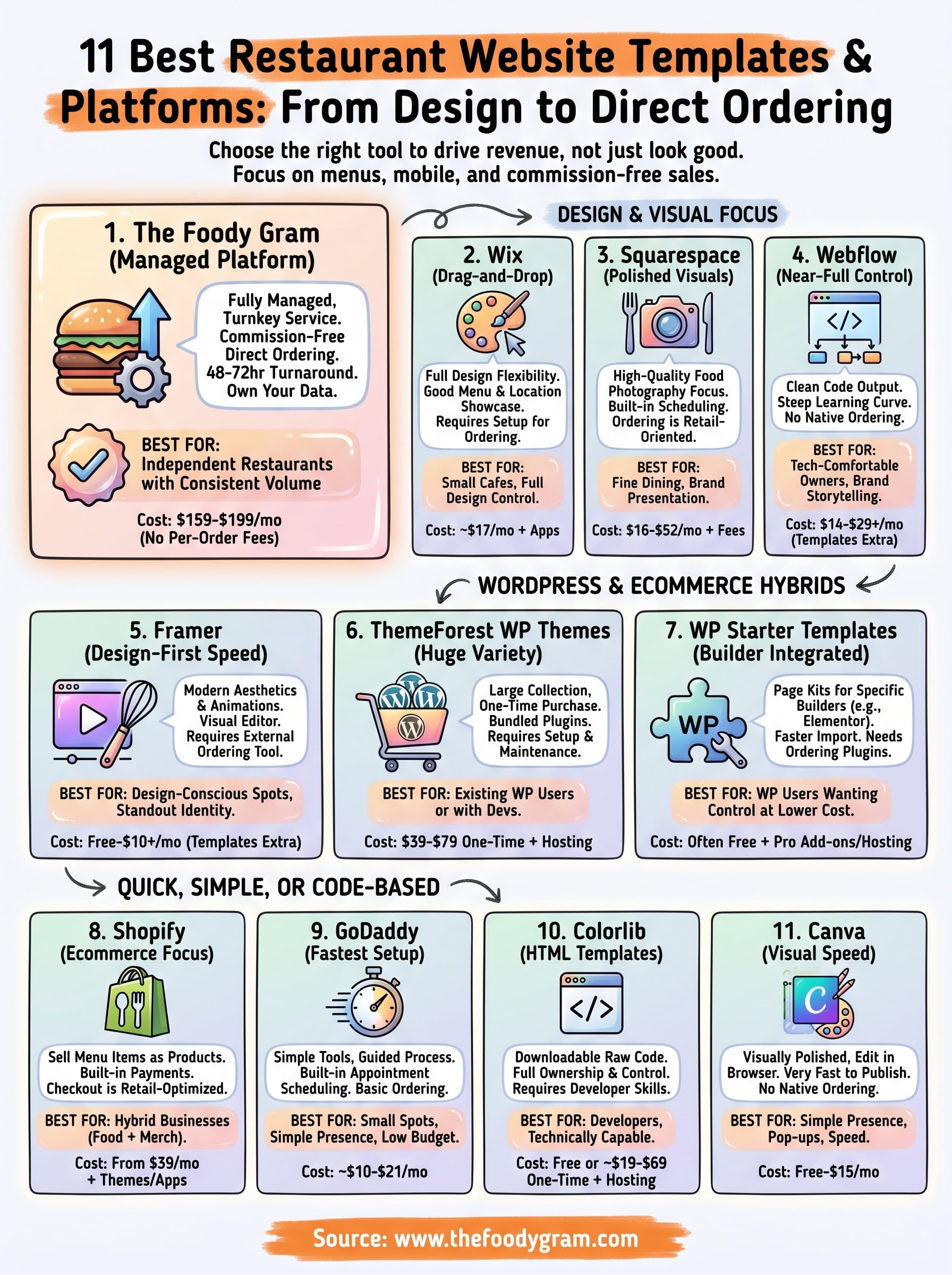
Every platform on this list of best restaurant website templates solves a different problem. Wix, Squarespace, and Canva give you design control at a low monthly cost. Webflow and Framer suit restaurants focused on visual identity. ThemeForest and WordPress builder kits work well if you have developer support. Shopify and GoDaddy cover basic ordering and ecommerce. Colorlib fits technically capable owners who want full code ownership.
If you run a restaurant with consistent online order volume and you're tired of losing margin to third-party delivery apps, The Foody Gram is built specifically for that situation. You get a branded, commission-free ordering site live within 48 to 72 hours, with no setup fees and a 45-day money-back guarantee. No contracts, no technical headaches, and no per-order commissions eating into your profit. Check out our pricing plans and platform features to see what makes sense for your restaurant.