


Online Reputation Management for Restaurants: A How-To Guide
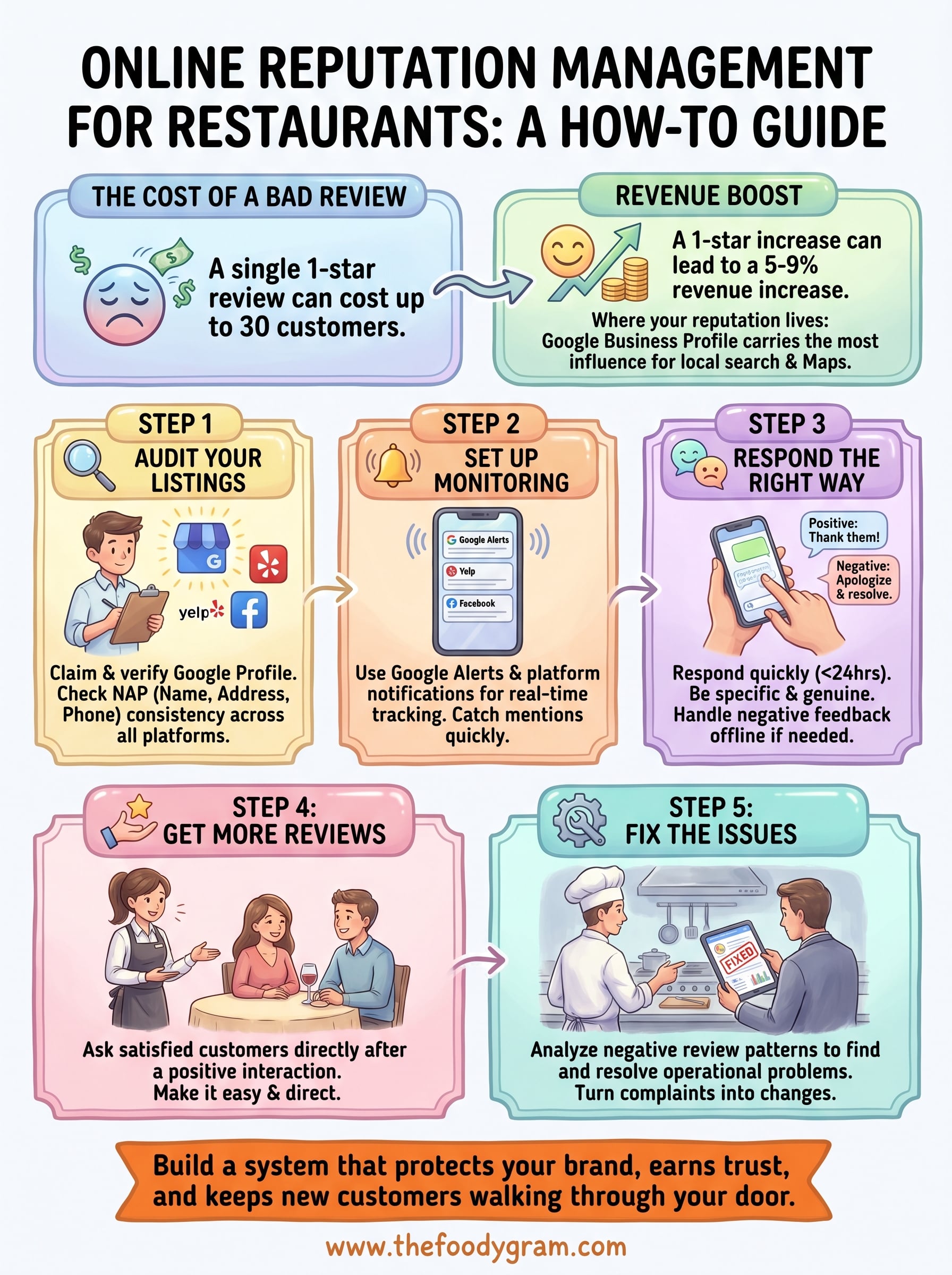
A single one-star review can cost a restaurant up to 30 customers. Multiply that across Google, Yelp, and social media, and the damage adds up fast. Online reputation management for restaurants isn't just about responding to bad reviews, it's about building a system that protects your brand, earns trust, and keeps new customers walking through your door.
Here's the reality: most diners check reviews before they ever place an order. What they find, good or bad, shapes whether they choose your restaurant or scroll to the next one. You could serve the best food in your city and still lose business to a competitor with a stronger online presence and better review management habits.
The good news? You have more control than you think. And that control starts with owning your digital presence. At The Foody Gram, we help restaurants take back that ownership with branded websites and commission-free online ordering, giving you a direct line to your customers instead of handing that relationship to third-party apps. But your website is only one piece of the puzzle. What people say about you online matters just as much as where they find you.
This guide breaks down exactly how to monitor, manage, and improve your restaurant's online reputation. You'll get actionable strategies for handling reviews, building a positive brand image, and choosing the right tools to automate the process, so you can spend less time refreshing Yelp and more time running your kitchen.
What online reputation means for restaurants
Your restaurant's online reputation is the sum of everything people find and say about your business across the internet. This includes your star ratings on Google and Yelp, comments on Facebook, photos customers post on Instagram, mentions on food blogs, and how your menu appears on third-party listing sites. Every one of these touchpoints shapes a potential customer's first impression before they ever taste your food or place an order.
Most restaurant owners treat reputation management as damage control, something you do after a bad review shows up. But online reputation management for restaurants is really a proactive discipline. It means building systems that monitor what people say, encourage satisfied customers to share their experiences, and give you the tools to respond quickly when something goes wrong. The difference between a restaurant that grows steadily and one that stalls often comes down to how actively each one manages this process.
Where your reputation actually lives
Your reputation doesn't sit in one place. It spreads across a network of platforms, each with its own audience, rules, and weight in search results. Google Business Profile carries the most influence because it directly affects how you appear in local search and on Google Maps, which is where most diners start looking for a place to eat. Yelp holds strong in certain cities and dining categories. Facebook reviews matter to older demographics and community-focused customers, while OpenTable and Resy ratings influence reservation decisions. TripAdvisor still drives significant traffic for restaurants in tourist-heavy areas.
Here's a breakdown of the major platforms and what each one influences:
| Platform | Primary audience | Key impact |
|---|---|---|
| Google Business Profile | All diners | Local search rankings and Maps visibility |
| Yelp | Urban diners, food-focused users | Discovery and trust signals |
| Community and local followers | Social proof and direct messages | |
| TripAdvisor | Tourists and travelers | Destination dining decisions |
| OpenTable / Resy | Reservation-driven diners | Booking conversion |
Knowing where your reputation lives helps you prioritize where to focus your time. Google should almost always come first, followed by whichever secondary platforms your specific customer base relies on most.
How reviews directly affect your revenue
The numbers behind online reviews are hard to ignore. Research from Harvard Business School found that a one-star increase in a restaurant's Yelp rating can translate into a 5 to 9 percent increase in revenue. Negative reviews, left unaddressed, compound that effect. A pattern of unresolved complaints signals to both potential customers and search algorithms that something is consistently broken.
A single negative review rarely ruins a restaurant, but a pattern of them with no owner response tells every new customer that you don't care enough to fix the problem.
Beyond individual revenue impact, your average star rating and total review count affect where you rank in local search results. Google factors in review frequency, recency, and owner response rate when deciding which local businesses to surface. Restaurants that respond to reviews consistently earn stronger visibility over time, which feeds more customers directly into their ordering funnel. That's why reputation management isn't just a customer service task: it's a direct lever on how easily new customers can find you in the first place.
Step 1. Audit your listings and Google profile
Before you can manage anything, you need to know what exists. A listing audit gives you a complete picture of how your restaurant appears across the internet, including outdated phone numbers, wrong addresses, duplicate profiles, and unclaimed listings that anyone could edit. This is the foundation of effective online reputation management for restaurants, and it takes less than an hour to complete. Most restaurant owners skip this step and then wonder why their reputation efforts aren't moving the needle.
Claim and verify your Google Business Profile
Your Google Business Profile is the single most important listing you own. If you haven't claimed it yet, go to google.com/business and search for your restaurant name. Claim the profile and complete the verification process, which Google typically handles through a postcard, phone call, or email depending on your account. Once verified, fill out every available field: hours, address, phone number, website URL, menu link, photos, and business category. An incomplete profile leaves money on the table.

An incomplete Google profile signals low trust to both diners and Google's ranking algorithm, so treat it like your digital front door.
After you claim the profile, check these elements specifically:
- Business name: matches exactly how it appears on your signage and website
- Address: formatted consistently and points to the correct pin on Maps
- Phone number: active and routes directly to your restaurant
- Hours: current and updated for holidays or seasonal changes
- Photos: at least 10 high-quality images covering food, interior, and exterior
- Primary category: set to the most specific option available, such as "Pizza Restaurant" rather than just "Restaurant"
Audit your other listings for consistency
Google isn't the only place where wrong information damages your reputation. Yelp, Facebook, TripAdvisor, and Apple Maps all pull from your listing data, and inconsistencies across platforms confuse search engines and frustrate customers who find outdated details. This is called NAP consistency, where NAP stands for Name, Address, and Phone number.
Run a quick audit using this checklist across every major platform:
| Platform | Claimed? | NAP accurate? | Hours current? | Photos added? |
|---|---|---|---|---|
| Google Business Profile | Yes/No | Yes/No | Yes/No | Yes/No |
| Yelp | Yes/No | Yes/No | Yes/No | Yes/No |
| Yes/No | Yes/No | Yes/No | Yes/No | |
| TripAdvisor | Yes/No | Yes/No | Yes/No | Yes/No |
| Apple Maps | Yes/No | Yes/No | Yes/No | Yes/No |
Fix every discrepancy you find before moving on. Consistent, accurate listings make every other step in this guide more effective.
Step 2. Set up monitoring for every channel
Once your listings are accurate, you need a system that tells you when something new happens. Manual checking wastes time and still leaves gaps. Setting up monitoring across every major channel means you catch reviews, mentions, and customer complaints within hours, not days. Speed matters here because a response within 24 hours signals to both the reviewer and every potential customer reading that thread that you take your business seriously.
Use Google Alerts and platform notifications
The simplest free tool available to you is Google Alerts. Go to the Alerts page and create a new alert for your restaurant name, your address, and any common variations customers might use when referencing you. Set the frequency to "As it happens" and deliver results directly to your email. This setup takes under five minutes and surfaces any new web mention, blog post, or news reference straight to your inbox without requiring you to check anything manually.
Most restaurant owners only find out about a damaging mention weeks after it goes live, by which point the story has already shaped how new customers see the place.
Beyond Google Alerts, turn on native email or push notifications inside each platform you claimed during your audit. Google Business Profile, Yelp, and Facebook all allow you to enable review alerts from within their dashboard settings. On Yelp, navigate to Business Account settings and enable "New Review Alerts." On Google, open your Business Profile manager and confirm notifications are active under the Settings tab. These built-in alerts cost nothing and keep you informed without any third-party software required.
Build a simple weekly review log
Effective online reputation management for restaurants works best when you pair automated alerts with a short, consistent manual check. Set a recurring calendar reminder every Monday morning to open each platform and scan for new reviews, flagged photos, or unanswered questions in the Q&A section. This habit takes roughly 15 minutes and catches anything the automated alerts may have missed.
Use this weekly log template to record what you find:
| Date | Platform | Rating | Review summary | Response sent? | Issue flagged? |
|---|---|---|---|---|---|
| MM/DD | 4 stars | Praised food, mentioned wait time | Yes | Yes | |
| MM/DD | Yelp | 2 stars | Wrong order received | No | Yes |
| MM/DD | 5 stars | Loved the new menu item | Yes | No |
Keeping a log like this gives you a running record of patterns over time, which turns vague complaints into specific, fixable operational problems you can actually act on.
Step 3. Respond to reviews the right way
Responding to reviews is one of the highest-leverage activities in online reputation management for restaurants. Every response you write gets read by far more people than just the original reviewer. When a potential customer scrolls through your Google profile, they pay close attention to how you handle criticism and whether you acknowledge praise. Your tone, speed, and specificity all signal what kind of operation you run, so treat each response as public-facing communication, not a private exchange.
Handle negative reviews with a clear structure
Negative reviews sting, but a well-crafted response does more to protect your reputation than the original complaint ever could. Respond within 24 hours, stay specific, and always take the conversation offline when the situation requires real resolution. Avoid generic apologies that don't address what the customer actually said, because vague responses read as dismissive and often push readers further away rather than building any trust back.
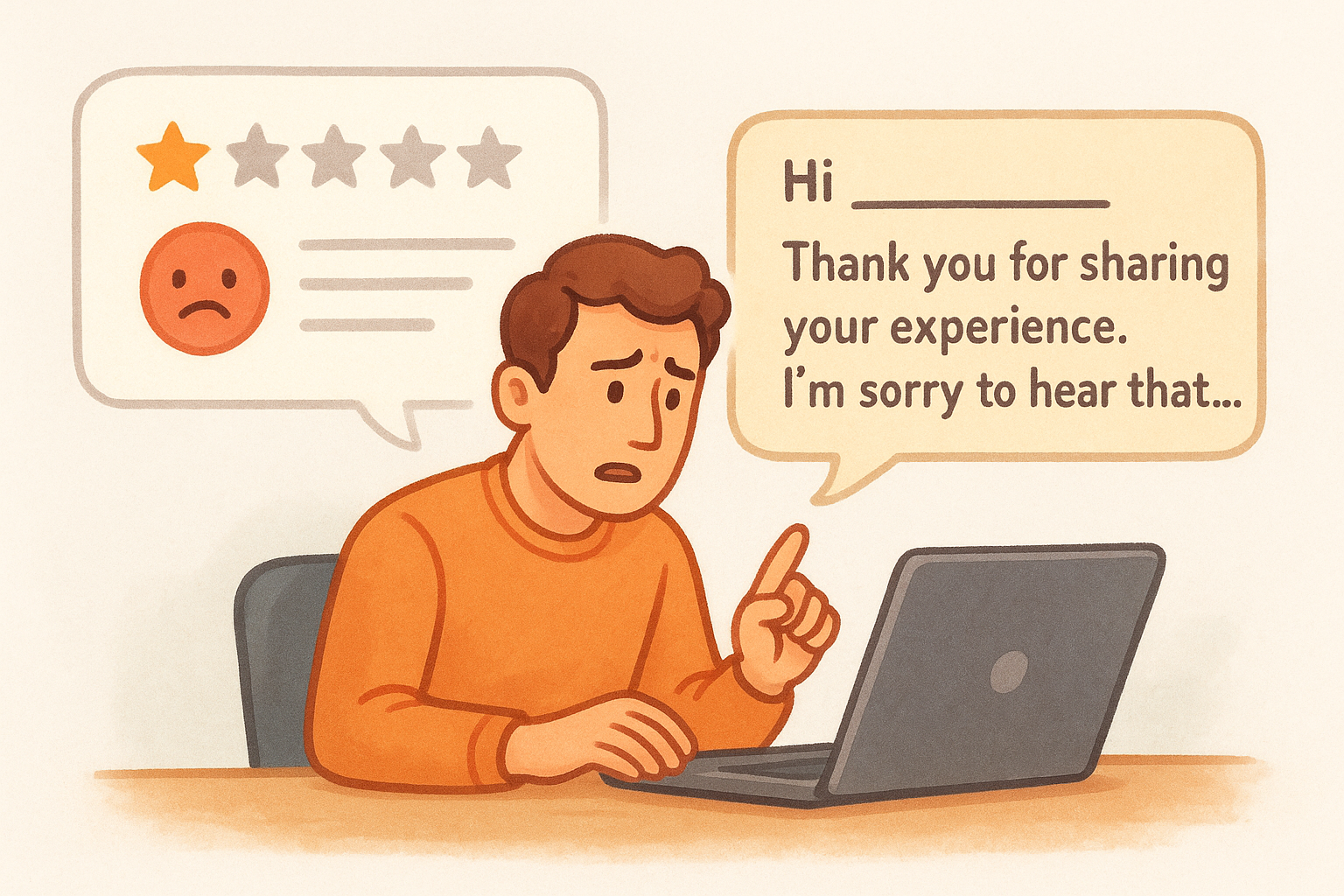
A measured, specific response to a one-star review often converts skeptical readers into customers more effectively than a wall of five-star praise with no owner voice behind it.
Use this template as your starting point for negative review responses:
Hi [Name or "there"],

Thank you for sharing your experience. I'm sorry to hear that
[specific issue they mentioned] didn't meet your expectations.
That's not the standard we hold ourselves to, and I want to
make it right.

Please reach out to us directly at [phone/email] so we can
resolve this personally.

[Your name], [Your role]
[Restaurant name]
Customize every response. Use the customer's name when they provided it, and reference the specific issue they raised rather than copying and pasting the same text across multiple complaints. Reviewers and readers both notice when responses feel templated.
Respond to positive reviews too
Positive review responses are easy to skip because they feel less urgent, but skipping them is a mistake. Thanking customers publicly reinforces the behavior you want repeated and shows every new reader that a real person is running this restaurant. Keep positive responses short, genuine, and specific to what they mentioned. If someone praised a particular dish, name it. Two sentences is enough, and more often than not it's the right amount.
Vary your language across positive responses so your profile doesn't look automated. Personalized replies take under 90 seconds to write and build real credibility with anyone evaluating your restaurant before their first visit.
Step 4. Get more reviews without breaking rules
Getting more reviews is one of the most reliable levers in online reputation management for restaurants, but the way you ask matters as much as whether you ask. Google and Yelp both prohibit incentivizing reviews in any form: that means no discounts, no free items, and no "leave us a review and get 10% off" cards on the table. Violating these policies can get your reviews filtered or your listing penalized, which undoes every other effort you've put into this process. The right approach is simpler: make it easy and ask at the right moment.
Ask at the right moment
The best time to request a review is immediately after a positive interaction, when the experience is fresh and the customer's goodwill is at its highest. Train your staff to close dine-in orders with a brief, natural ask: "If you enjoyed your meal tonight, we'd really appreciate a review on Google." For online orders, send a follow-up message through your ordering platform shortly after the order is confirmed. Keep the request short and direct, link them exactly where you want them to go, and never ask twice.
The restaurants that build the strongest review volume are not the ones with the best food. They are the ones that ask consistently and make the process frictionless.
Use this template for post-order follow-up messages:
Hi [First Name],

Thanks for ordering from [Restaurant Name] today.
If you enjoyed your meal, it would mean a lot if
you shared your experience on Google:

[Your Google Review Link]

It takes under a minute and helps us more than you know.

Thanks,
[Your Name]
[Restaurant Name]
What to avoid
Certain review practices look effective on the surface but carry real risk. Buying reviews, posting fake ones, or pressuring unhappy customers to remove or change their ratings all violate platform terms and can result in public warning labels on your profile. Both Google and Yelp run detection systems specifically built to flag unusual review patterns. Yelp displays consumer alerts on listings they suspect of soliciting reviews, which does more reputational damage than a low star count ever would.
Stick to these boundaries when building your review volume:
- Ask customers directly, never bribe or incentivize
- Do not request reviews in bulk from friends or staff
- Do not ask customers to post reviews from your restaurant's Wi-Fi (flags same-location patterns)
- Never offer rewards specifically tied to leaving a positive rating
- Respond to every review you receive, good or bad
Step 5. Fix the issues driving bad feedback
Responding to reviews handles the public-facing side of your reputation, but it doesn't solve the underlying problems. Every negative review is a data point, and when you look at them as a group rather than individual complaints, patterns emerge that point directly to fixable operational issues. Effective online reputation management for restaurants means closing the loop between what customers say and what actually changes in your kitchen or front-of-house. A restaurant that responds well but never improves will eventually exhaust the goodwill those responses buy.
Find the pattern in your complaints
Your review log from Step 2 becomes a diagnostic tool at this stage. Read through your last 20 to 30 negative reviews and group them by the issue type they describe. If six different people mentioned slow service on Friday nights, that's a staffing or workflow problem, not six separate bad experiences. Categorizing complaints by theme turns scattered feedback into a ranked list of the actual problems worth solving first.
Use this tracking format to map your complaint patterns:
| Complaint category | Frequency | Likely root cause | Assigned to |
|---|---|---|---|
| Long wait times | 8 mentions | Understaffed peak hours | Manager |
| Wrong or missing items | 5 mentions | Handoff process between kitchen and front | Kitchen lead |
| Cold food on delivery | 4 mentions | Packaging or driver wait time | Owner |
| Rude staff interaction | 3 mentions | Training gap | Manager |
Once you can see your complaints as a ranked list, fixing your reputation becomes a management task rather than a guessing game.
Turn complaints into operational changes
Finding the pattern is only useful if you act on it. Pick the top two complaint categories from your log and define one specific, measurable change for each within the next 30 days. Keep the scope tight so the change actually happens. For example, if wrong orders are your most common complaint, introduce a read-back confirmation at the point of handoff and track whether that category drops over the following month.
Document every change and assign it to a specific person on your team with a clear deadline. Vague commitments like "we'll try to be faster" don't stick. A written change with an owner and a timeline does. Once you resolve the first two issues, move to the next items on your list and repeat the same process.
Keep your reputation strong week to week
Online reputation management for restaurants is not a one-time project. It's a weekly habit built from the five steps in this guide: accurate listings, active monitoring, timely responses, consistent review requests, and operational fixes tied directly to customer feedback. Each piece reinforces the others, and the restaurants that do this consistently pull ahead of competitors who only react when something goes wrong.
Start small if you need to. Pick one step this week, complete it fully, and add the next one the following week. Within a month, you'll have a working system that runs on roughly 30 minutes a week. Your reputation grows in proportion to how seriously you take that time.
When you're ready to give customers a direct, branded place to order from you, see what The Foody Gram offers and put your ordering channel fully under your own control.