


9 Restaurant Email Marketing Templates That Drive Orders
Most restaurants collect email addresses but never do anything useful with them. Meanwhile, third-party apps are marketing to your customers using your data, and charging you 30% for the privilege. The fix isn't complicated: restaurant email marketing templates that are ready to send and built to bring orders directly to your door.
Email remains one of the highest-ROI marketing channels available, and restaurants are uniquely positioned to use it well. Your customers already know your food. They just need a reason to order again, and a direct link to your own ordering system instead of a third-party app skimming your margins.
At The Foody Gram, we help restaurants own their online ordering and their customer relationships. That's why we put together these 9 proven email templates, covering everything from promotions and re-engagement campaigns to booking confirmations, so you can copy, customize, and start driving more orders this week.
1. Commission-free online ordering promotion email
This is the most important email in your restaurant email marketing templates library. It redirects customers away from third-party apps and sends them to your own ordering page, where you keep 100% of the revenue instead of handing 30% to a delivery platform.
When to send it and what it should drive
Send this email when you launch your direct ordering system or any time you want to shift customer behavior. The goal is straightforward: drive your first commission-free orders and show customers that ordering directly from you is fast and simple.
Subject line and preview text options
- Subject: Order directly from us, no app needed
- Preview: Skip the middleman and order straight from [Restaurant Name]
- Subject: We now take orders right here
- Preview: Easier ordering, and you support us directly
Copy and paste email template
Replace everything in brackets with your actual details before you hit send.
Hi [First Name],
You can now order directly from us at [YourWebsite.com]. No third-party apps, no extra fees added at checkout. Just the food you love, available for pickup or delivery on your schedule.
Place your order here: [Direct ordering link]
Thanks for ordering directly from us.
[Restaurant Name]
HTML layout notes and image guidance
Keep the design single-column with a strong hero image of your best-selling dish placed at the top. Put your CTA button above the fold so readers see it without scrolling, and keep the body copy under 150 words so nothing buries your link.
Personalization and segmentation ideas
If your email platform supports it, address each customer by first name and segment your list by order history. Customers who previously ordered through a third-party app are your highest-priority audience for this campaign since they already know your menu.
CTA links that send people straight to your ordering page
Your button should link directly to your ordering page, not your homepage. Use a clear label like "Order Now" and test the link on mobile before sending, since most customers will open the email on their phone.
Footer and compliance block
Include your restaurant name, physical address, and phone number in the footer. Add a working unsubscribe link to satisfy CAN-SPAM requirements and protect your sender reputation with email providers.
2. Welcome email that turns subscribers into first-time buyers
A welcome email is your best chance to convert a curious subscriber into a paying customer. Most restaurants skip it entirely, which means they lose momentum at the moment when a new contact is most engaged with their brand.
When to send it and what it should drive
Send this email automatically within 15 minutes of someone subscribing to your list. The goal is to deliver a clear first-order incentive before the subscriber's interest fades.
Subject line and preview text options
- Subject: Welcome, here's something for your first order
- Preview: We're glad you're here. Let's get you fed.
- Subject: Your first order from us just got sweeter
- Preview: A thank-you offer, waiting inside
Copy and paste email template
Replace everything in brackets with your actual details before sending.
Hi [First Name],
Welcome to [Restaurant Name]. We'd love to make your first order directly through us a great one.
Use this offer at checkout: [Discount Code or Free Item]
Order here: [Direct ordering link]
See you soon, [Restaurant Name]
HTML layout notes and image guidance
Use a warm, welcoming hero image of your dining space or a crowd-favorite dish. Keep your offer front and center in bold text so subscribers do not miss it.
Personalization and segmentation ideas
Tag new subscribers by the channel where they signed up, such as your website or a social link. This helps you track which source brings the highest first-order conversion rate across your restaurant email marketing templates.
Offer ideas that protect margins
Stick to low-cost, high-perceived-value items like a free appetizer or a small discount on a minimum order. Avoid blanket percentage discounts on the full order, since those cut deep into your margin on larger tickets.
Footer and compliance block
Your footer needs your restaurant name, address, and an unsubscribe link to stay compliant with CAN-SPAM rules and maintain your email deliverability.
3. Abandoned order or checkout reminder email
An abandoned checkout is money that almost made it to your register. This email is designed to recover that lost revenue by reminding customers that their food is still waiting, with a direct link back to complete their order.
When to send it and what it should drive
Send this email 30 to 60 minutes after a customer drops off your ordering page without completing a purchase. The goal is to bring them back before they order from a competitor or forget entirely.
Subject line and preview text options
- Subject: You left something behind
- Preview: Your order from [Restaurant Name] is still here
- Subject: Still hungry? Your cart is waiting
- Preview: Pick up right where you left off
Copy and paste email template
Replace everything in brackets with your actual details before sending.
Hi [First Name],
Looks like you started an order with us but didn't finish. Your cart is still saved at [YourWebsite.com] and it only takes a minute to complete.
Finish your order here: [Direct ordering link]
[Restaurant Name]
HTML layout notes and image guidance
Use a clean, minimal layout with one clear CTA button. Adding an image of a menu item from their cart, if your platform supports it, increases click-through rates noticeably.
Common friction points to address in the copy
Payment confusion and uncertainty about delivery time are the two biggest reasons customers abandon checkout. Address both directly in a short line of supporting copy beneath your CTA button.
Personalization and segmentation ideas
Your restaurant email marketing templates perform better when the reminder references what the customer was ordering. Even a simple "still craving that pizza?" line lifts recovery rates compared to generic copy.
Footer and compliance block
Include your restaurant name, address, and a working unsubscribe link to stay CAN-SPAM compliant and protect your sender reputation.
4. Order confirmation email with smart upsells
Your order confirmation email is the one message every customer expects to receive, which makes it prime real estate in your restaurant email marketing templates strategy. Most restaurants send a bare-bones receipt and nothing else. A well-built confirmation does two jobs at once: it reassures the customer and nudges them toward a second purchase.
When to send it and what it should drive
Send this email immediately after a customer places an order. The goal is to confirm the transaction, build trust, and surface a relevant add-on or upsell while the customer is already in a buying mindset.
Subject line and preview text options
- Subject: Your order is confirmed, [Restaurant Name]
- Preview: Here are your order details, plus something you might like
- Subject: Order received, thank you!
- Preview: Everything you need to know about your order
Copy and paste email template
Replace everything in brackets with your actual details before sending.
Hi [First Name],
Your order is confirmed. Here's a quick summary:
Order: [Item Name], [Item Name] Total: $[Amount] Estimated time: [Pickup/Delivery time]
Questions? Call us at [Phone Number].
[Restaurant Name]
Receipt section checklist so customers trust it
Your receipt block should include every item ordered and the full charge with taxes. A scannable list helps customers verify without calling you:
- Item names and quantities
- Subtotal, tax, and total
- Estimated pickup or delivery time
- Direct contact number
Upsell blocks that feel helpful, not pushy
Place your upsell below the receipt block, not above it. Suggest one complementary item like a drink or dessert with a short line such as "Customers who ordered this also love our [Item Name]." Keep the upsell block brief so it feels like a helpful tip rather than a sales push.
Footer and compliance block
Include your restaurant name, address, and an unsubscribe link to stay CAN-SPAM compliant and protect your sender reputation.
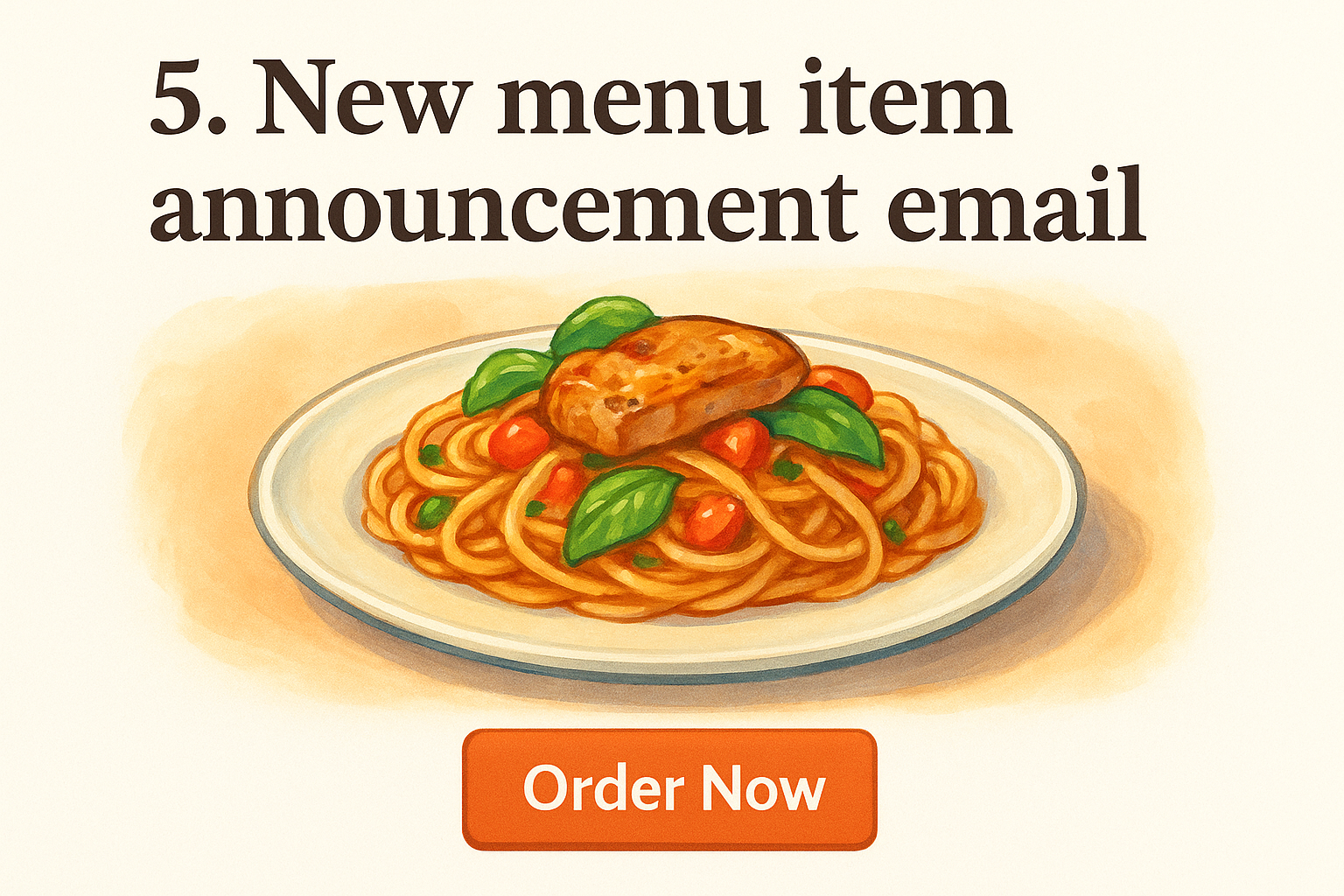
5. New menu item announcement email
A new dish gives you a legitimate reason to hit your list, and customers who already love your food are your most receptive audience. Use this email to build excitement and send people directly to your ordering page before the novelty fades.
When to send it and what it should drive
Send this email on launch day or one day before the new item goes live. The goal is to generate curiosity and convert it into an immediate order from customers who trust your menu.
Subject line and preview text options
- Subject: Something new is on the menu
- Preview: We think you're going to want to try this
- Subject: Fresh drop: [Item Name] is here
- Preview: Available now for pickup or delivery
Copy and paste email template
Replace everything in brackets with your actual details before you hit send.
Hi [First Name],
We just added [Item Name] to our menu. [One sentence description that highlights the key ingredient or flavor.] Order it today for pickup or delivery at [YourWebsite.com].
[Restaurant Name]
HTML layout notes and image guidance
Lead with a bold, high-quality photo of the new dish so the visual does the selling. A single CTA button labeled "Order Now" placed directly beneath the image keeps the layout clean and drives clicks without distraction.
Positioning angles that make people crave the item
Lead with flavor, not process. Describe what makes the dish taste memorable rather than how it's made. Short, sensory language outperforms generic copy in your restaurant email marketing templates every time.
Segmentation ideas based on past orders and preferences
Send this email first to customers who frequently order similar items. A customer who orders pasta regularly is far more likely to try a new pasta dish than someone who sticks to your pizza menu.
Footer and compliance block
Keep your restaurant name, physical address, and a working unsubscribe link in the footer to stay CAN-SPAM compliant and maintain strong email deliverability.
6. Weekly specials newsletter that drives repeat orders
A weekly specials email keeps your restaurant in your customers' minds every single week without requiring a major new promotion or big campaign. Done consistently, it becomes the kind of email your regulars look forward to opening each time it lands.
When to send it and what it should drive
Send this email every Tuesday or Wednesday, when people start thinking about their weekend meals and midweek dinner plans. The goal is to drive repeat orders from customers who already know and like your food.
Subject line and preview text options
- Subject: This week's specials at [Restaurant Name]
- Preview: Fresh picks, ready for pickup or delivery
- Subject: What's good this week
- Preview: Order straight from us at [YourWebsite.com]
Copy and paste email template
Replace everything in brackets with your actual details before sending.
Hi [First Name],
Here's what's on special this week at [Restaurant Name]:
[Special 1] - [Short description and price] [Special 2] - [Short description and price] [Special 3] - [Short description and price]
Order now: [Direct ordering link]
[Restaurant Name]
A simple, skimmable structure for multiple offers
Your weekly specials newsletter, as part of your broader restaurant email marketing templates strategy, works best with a bold item name, one-line description, and price for each special. Keep the list to three or four items so readers can scan it in under ten seconds without losing interest.
How to rotate content so people do not tune out
Change at least one featured item every week to give returning readers a reason to open the next email. Mixing seasonal ingredients and longtime customer favorites keeps the newsletter feeling current without requiring a full redesign each time you send.
Footer and compliance block
Include your restaurant name, address, and a working unsubscribe link in the footer to stay CAN-SPAM compliant and protect your email deliverability long-term.
7. Limited-time discount or bundle email
A limited-time offer gives your existing customers a concrete reason to order today instead of later. Use this email to move slow inventory, fill a slow night, or reward loyal customers with a bundle deal that protects your average ticket size.
When to send it and what it should drive
Send this email 24 to 48 hours before the offer expires so the deadline feels real, not arbitrary. The goal is to spike order volume during a specific window without training customers to wait for discounts every week.
Subject line and preview text options
- Subject: Today only: [Offer] at [Restaurant Name]
- Preview: This deal ends tonight, order now
- Subject: Bundle deal, available this weekend only
- Preview: Grab it before it's gone at [YourWebsite.com]
Copy and paste email template
Replace everything in brackets with your actual details before sending.
Hi [First Name],
For the next [X hours/days], you can grab our [Bundle Name or Discount Offer] at [YourWebsite.com]. [One line describing what's included or what you save.] This offer ends at [Time/Date].
Order here: [Direct ordering link]
[Restaurant Name]
How to create urgency without sounding spammy
Specific deadlines beat vague language every time. Saying "offer ends Friday at 9 PM" outperforms "limited time only" because it gives customers a clear reason to act now rather than later.
Guardrails for profitable discounts and bundles
Your restaurant email marketing templates should never offer a discount you cannot afford. Bundle items with strong margins alongside lower-margin ones so the overall ticket stays profitable even after the discount is applied.
Footer and compliance block
Include your restaurant name, address, and a working unsubscribe link to stay CAN-SPAM compliant and protect your sender reputation over time.
8. Holiday pre-order and catering email
Holiday seasons are your biggest revenue opportunity of the year, and a pre-order email lets you capture that demand before customers make other plans. This template belongs in every set of restaurant email marketing templates because it drives both individual orders and larger catering commitments in a single send.
When to send it and what it should drive
Send this email two to three weeks before the holiday so customers have enough time to plan their meals and place a catering order. The goal is to fill your pre-order calendar early and secure catering revenue before competitors do.
Subject line and preview text options
- Subject: Pre-order your [Holiday] meal from [Restaurant Name]
- Preview: Skip the stress, we handle the food
- Subject: Holiday catering is now open
- Preview: Reserve your order before we fill up
Copy and paste email template
Replace everything in brackets with your actual details before sending.
Hi [First Name],
[Holiday] is coming and we're now taking pre-orders for pickup and catering at [YourWebsite.com]. Order by [Deadline Date] to guarantee your spot.
Reserve your order here: [Direct ordering link]
[Restaurant Name]
What to include so customers feel confident pre-ordering
Customers hesitate on pre-orders when cancellation terms and pickup windows are unclear. State your cutoff date, pickup or delivery window, and refund policy in plain language directly inside the email body.
Timing plan for announcement, reminder, and last call
Send your announcement email two to three weeks out, a reminder one week before the deadline, and a final last-call email 48 hours before you stop taking orders.
Footer and compliance block
Include your restaurant name, address, and a working unsubscribe link to stay CAN-SPAM compliant and protect your deliverability heading into the busy holiday period.
9. Win-back email for lapsed customers
A customer who ordered from you before and stopped is far easier to convert than a cold lead. They already know your food, they just need a nudge back. This email is one of the highest-performing templates in your restaurant email marketing templates toolkit because you're working with an existing relationship, not building one from scratch.
When to send it and what it should drive
Send this email to customers who haven't placed an order in 60 to 90 days. The goal is to remind them you exist and give them a clear reason to return before they get locked into the habit of ordering from somewhere else.
Subject line and preview text options
- Subject: We miss you, [First Name]
- Preview: Here's a reason to come back
- Subject: Been a while. Let us make it worth it.
- Preview: Something waiting for you at [Restaurant Name]
Copy and paste email template
Replace everything in brackets with your actual details before sending.
Hi [First Name],
It's been a while since your last order, and we'd love to have you back. [Offer or reason to return] is ready for you at [YourWebsite.com].
Order here: [Direct ordering link]
[Restaurant Name]
Incentive options beyond discounts
You don't need to cut your margin to win customers back. A free add-on item or priority pickup often feels more valuable than a percentage discount and costs you significantly less.
Segmentation ideas for light vs. heavy buyers
Split your lapsed list by order frequency before they went quiet. Heavy buyers deserve a stronger incentive, while light buyers respond well to a simple, low-barrier reminder tied to a menu update or seasonal item.
Footer and compliance block
Include your restaurant name, address, and a working unsubscribe link in every win-back email to stay CAN-SPAM compliant and protect your long-term deliverability.
Next steps
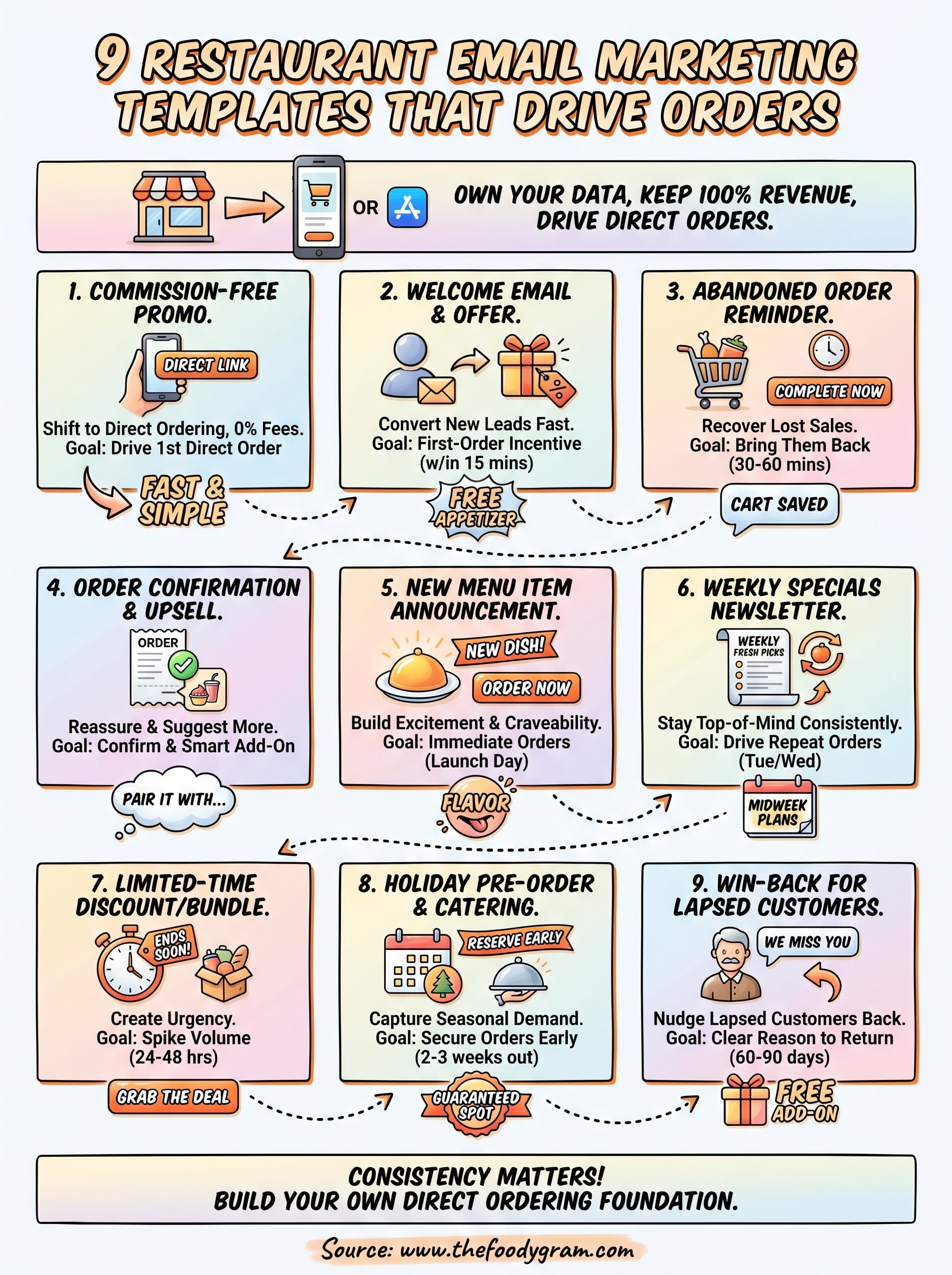
You now have nine restaurant email marketing templates you can copy, customize, and send today. Each one is built around a single goal: bring orders directly to your restaurant instead of routing customers through a third-party app that takes a cut of every transaction.
Start with the two that match your most immediate need. If you just launched direct ordering, send the commission-free promotion email first. If your list has gone quiet, the win-back email is your fastest path back to revenue. Consistency matters more than perfection, so pick a sending schedule you can actually maintain and stick to it.
Your email list only pays off when customers have a direct place to order, which means your own branded ordering page is the foundation everything else builds on. If you don't have one yet, see our restaurant online ordering plans and pricing and get your system live in 48 to 72 hours.